




By Ratnakar Bijili | 24 August 2026 | ~6 Minute Read
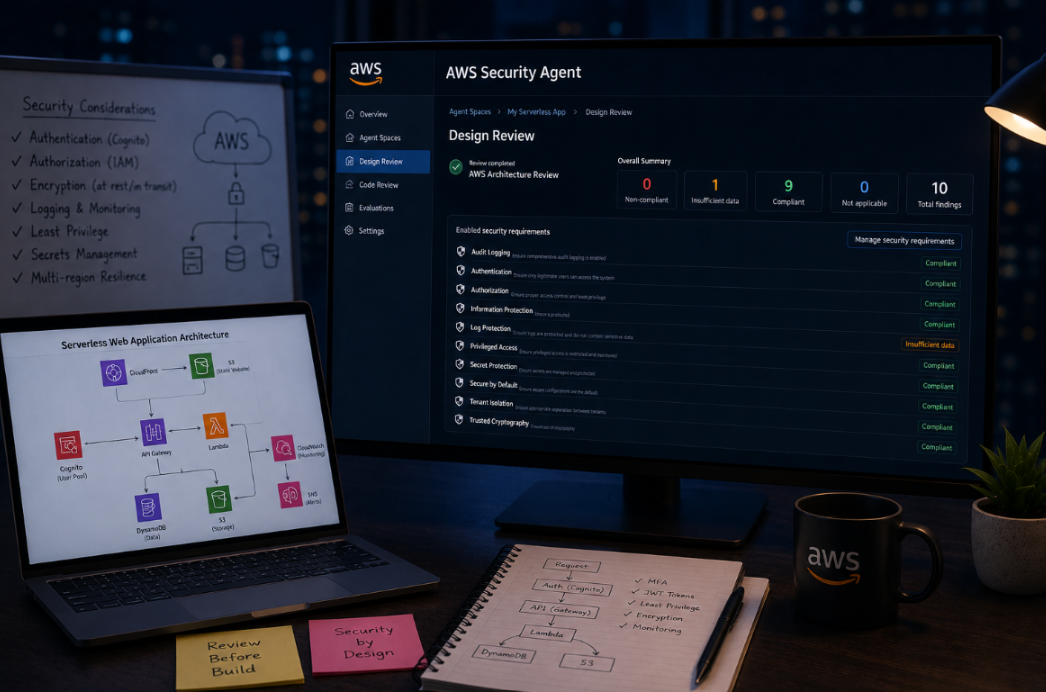
I've been building a serverless web application on AWS CloudFront and S3 for the frontend, API Gateway and Lambda for the backend, Cognito for auth, DynamoDB and S3 for data, CloudWatch and SNS for monitoring. Before writing any more code, I wanted a second pair of eyes on the design itself. So I tried out AWS Security Agent's Design Review feature, and the experience was simple enough that I want to walk through exactly how it works, because the barrier to trying this yourself is basically zero.
From Zero to Findings in Under Five Minutes
The whole workflow boils down to three steps:
- Create an Agent Space. Think of it as a container for one application or project.
- Upload your design documents and architecture. I uploaded two files: a written design document covering my security decisions, and the architecture diagram itself.
- Start the design review. The agent evaluates your upload against the security requirement packs already enabled in your space.
A few seconds later, I had a completed AWS Architecture Review with a full findings summary waiting for me.
What Gets Checked Is Configurable, and That's Worth Knowing Before You Start
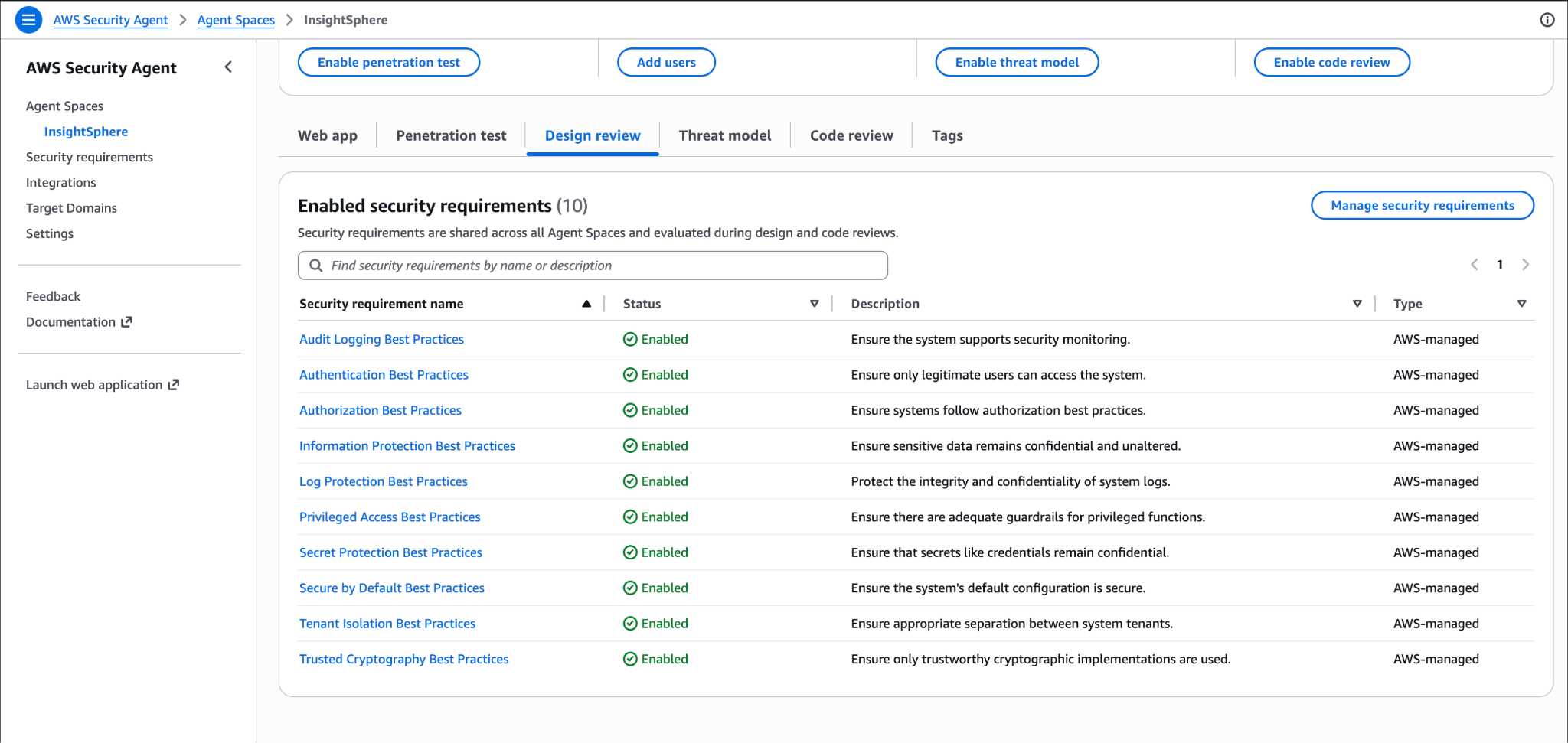
Before running anything, it's worth looking at what's actually being evaluated. Inside the Design review tab, there's an Enabled security requirements section, and by default AWS Security Agent ships with 10 AWS-managed requirement packs already turned on: Audit Logging, Authentication, Authorization, Information Protection, Log Protection, Privileged Access, Secret Protection, Secure by Default, Tenant Isolation, and Trusted Cryptography. Each one comes with a plain-language description of what it's checking, for example, Authentication Best Practices are there simply to ensure only legitimate users can access the system, and Tenant Isolation Best Practices ensure appropriate separation between system tenants.
A few things worth knowing about this setup:
- These requirements are shared across every Agent Space, not just the one you're currently in, so toggling something on or off here affects every design and code review you run going forward, across all your projects.
- You're not stuck with the defaults. A "Manage security requirements" button sits right next to the list, letting you enable additional AWS-managed packs, disable ones that don't apply to your system, or define entirely custom requirements in plain language, useful if your org has internal compliance rules that go beyond AWS's defaults (something like "all PII access must have session timeouts under 15 minutes" would fit here).
- This matters for interpreting results. If a requirement you care about isn't enabled, it simply won't show up in your findings at all, it won't appear as compliant, non-compliant, or even "not applicable." So before trusting a clean-looking findings summary, it's worth a quick check that the requirements list actually reflects everything you want evaluated.
I left mine at the default 10 for this run, since they map well onto the categories a serverless web app like mine actually needs to worry about. But knowing this knob exists changes how I'll use the tool going forward, I'll be adding a couple of custom requirements specific to my data handling before the next review.
The Results: Mostly Good News, One Real Catch
The summary was clean:
- 0 Non-compliant
- 1 Insufficient data
- 9 Compliant
- 0 Not applicable
- 10 total findings
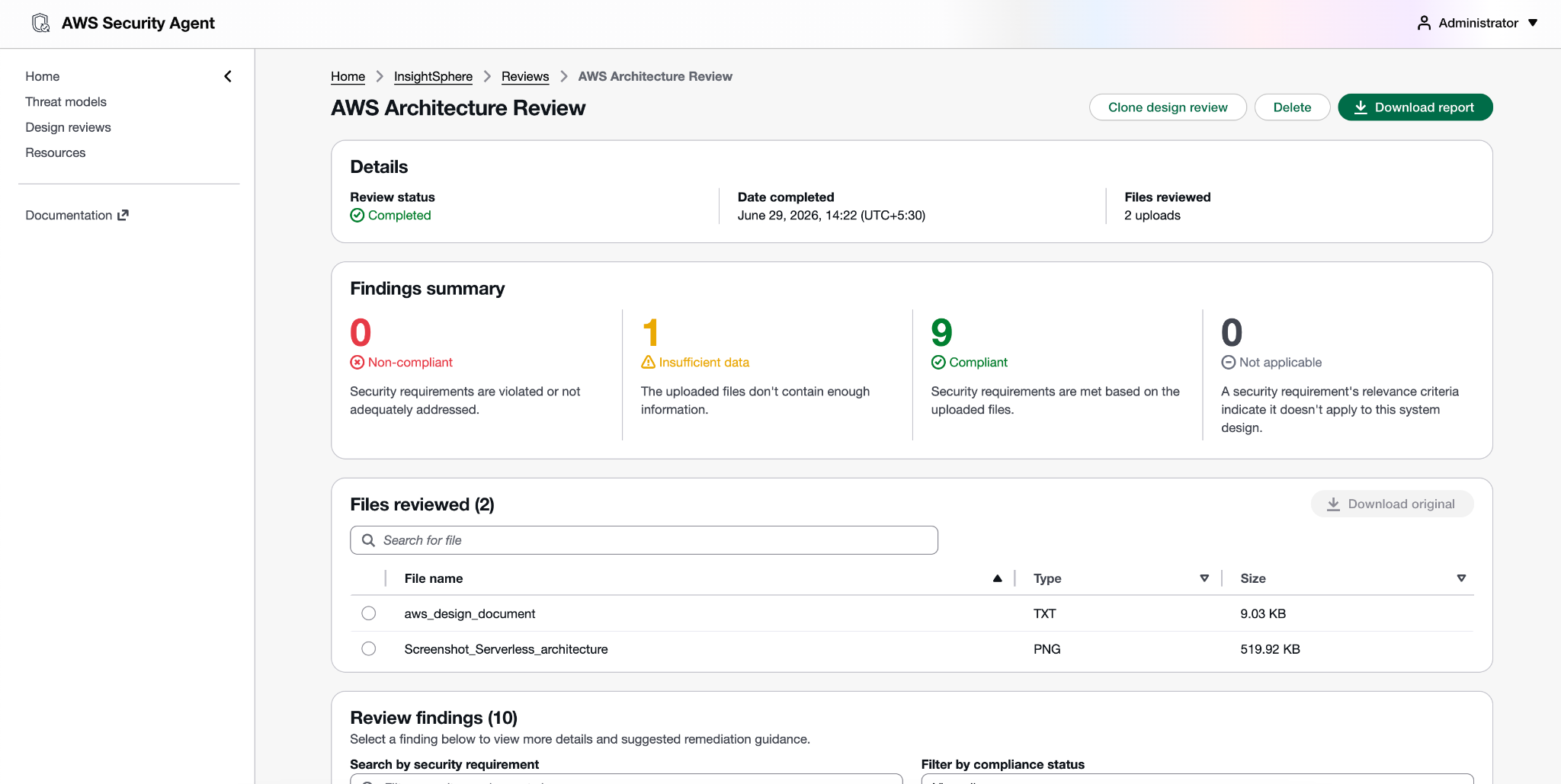
Nine out of ten requirements came back compliant outright, which was reassuring, but the real value wasn't in the checkmarks. It was in the one finding that wasn't a clean pass, and in how specifically the agent explained both the good and the not-quite-good-enough.
What it confirmed I got right: Authentication
The authentication-best-practices finding came back compliant, and the reasoning behind it was detailed rather than generic. The agent recognized that my system implements authentication using a Cognito User Pool with JWT-based token validation, short-lived access tokens (60-minute expiry), TOTP-based MFA enforcement, and an Authorizer Lambda that validates every API request before it reaches downstream handlers.
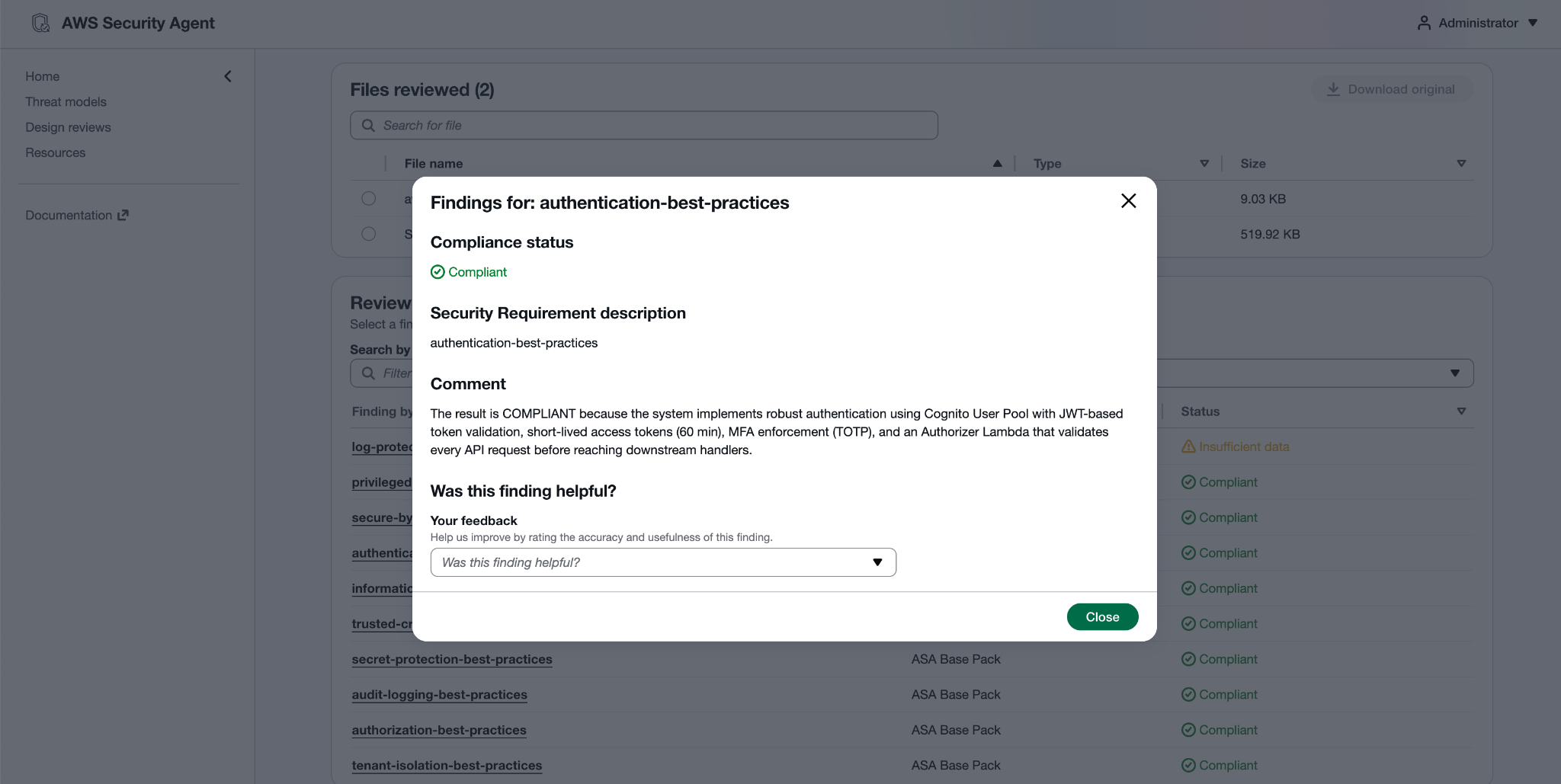
That's exactly the kind of depth I wanted from a review, it wasn't just checking "does Cognito exist," it was confirming that the specific mechanisms (token lifetime, MFA, per-request validation) actually added up to a sound authentication design.
What it caught that I genuinely hadn't thought about: PII in logs
This is the finding that made the whole exercise worth it. Log-protection-best-practices came back as "insufficient data", and the reasoning was sharp enough that it caught something I had completely missed.
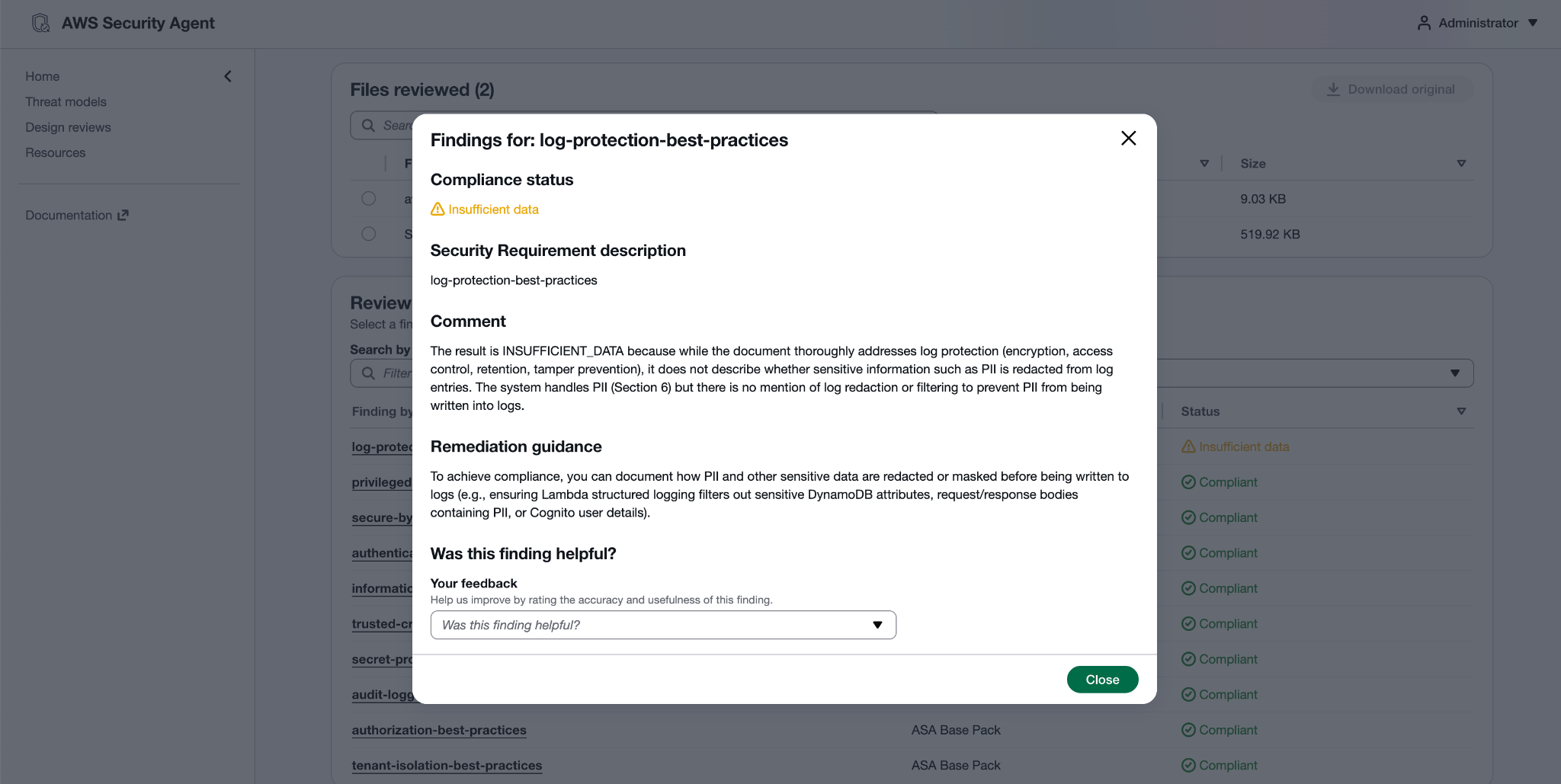
My design document was thorough on the mechanics of log protection: encryption, access control, retention, tamper prevention. All documented, all solid. But the agent pointed out something none of that addressed, whether sensitive information like PII is actually redacted from the log entries themselves. It connected this directly back to an earlier section of my own document, where I'd described the system as handling PII, and noted there was no mention of filtering or redacting that PII before it gets written into logs in the first place.
That's a real gap, and it's exactly the kind of thing that's easy to miss when you're focused on protecting logs at rest and forget to ask what's actually going into them. Encrypting a log bucket does nothing for you if the log entries inside it contain raw PII because a Lambda dumped a full request body into a log line for debugging purposes.
The remediation guidance was just as specific as the finding itself: document how PII and other sensitive data are redacted or masked before being written to logs, for example, ensuring Lambda structured logging filters out sensitive DynamoDB attributes, strips PII from request/response bodies, and avoids logging raw Cognito user details.
That's not vague advice. It's a checklist I can hand directly to whoever owns the logging implementation: filter DynamoDB attributes before logging, scrub request/response bodies, don't log raw Cognito user objects.
Why This Matters More Than the Score
If I'm honest, a 9/10 compliant score isn't really the headline here. The headline is that the one thing it flagged was a real, specific, easy-to-overlook gap, not a checkbox issue, but a genuine security blind spot connecting two parts of my own design that I hadn't connected myself. I'd written a thorough section on protecting logs and a thorough section on handling PII, and never noticed the seam between them where PII could leak into log entries unredacted.
That's the actual value proposition of a tool like this at the design stage: it's not just confirming you did things right, it's reading your entire design holistically and catching the places where two correct-looking decisions don't actually cover each other.
What Does This Actually Cost?
The good news: nothing, for now. Design Review currently falls under AWS's preview pricing, which means it's not billed. According to AWS's own FAQ, you get up to 200 design reviews per account per month at no charge while the feature remains in preview, the same applies to Code Review and Threat Modeling.
This is worth flagging clearly for anyone considering this seriously: only on-demand penetration testing has moved to paid, usage-based pricing so far ($50 per task-hour, metered per second), because that's the feature that reached General Availability in March 2026. Design Review hasn't made that jump yet.
One caveat for your own planning: "free in preview" is typically a temporary state, not a permanent one. AWS's own documentation doesn't say what Design Review pricing will look like once it exits preview, it could land on a flat per-review fee, something tied to task-hours like pen testing, or stay bundled into a broader subscription. If you're building this into a regular workflow, it's worth treating the current free tier as a generous trial window rather than assuming it's free forever.
For now, though: 200 reviews/month/account is a lot of runway to experiment, iterate on your design docs, and re-run reviews as your architecture evolves, all before spending a dollar.
What Could Be Improved (or Added)
No tool is perfect on a first real-world run, and a few things stood out as places where Design Review could go further:
Tighter guidance on what "good" input looks like before you upload. The file constraints (5 files, 2MB each, 6MB total) are clear, but there's no real guidance, a checklist or template, for instance on what level of detail in a design doc tends to produce solid verdicts versus "insufficient data." I had to learn this by trial and error across two reviews. A short "what to include" template tied to the enabled requirements would shortcut that learning curve significantly.
Severity or priority weighting on findings. All findings currently sit at the same visual weight like compliant, non-compliant, insufficient data, not applicable. A missing WAF and a missing PII-redaction note are not the same level of risk, but nothing in the UI signals that. Even a rough severity tag per finding would help teams triage what to fix first.
Direct linking between related findings. My PII-in-logs finding under Log Protection was really a consequence of something documented under Information Protection. The agent's reasoning made that connection in the comment text, but the UI itself doesn't cross-reference related findings, surfacing that link explicitly (e.g., "this finding relates to Information Protection #X") would make the holistic read-through the agent is clearly already doing more visible to the user.
My Takeaway
The setup cost here was trivial, create a space, check which security requirements are active, upload a doc and a diagram, click start. The output was a findings summary with reasoning detailed enough to act on immediately, including remediation guidance that read like something a human security reviewer would write, not boilerplate. The PII-in-logs catch alone was worth the exercise, it's the kind of gap that's easy to miss when you're heads-down on a build and exactly the kind of thing you want surfaced at the design stage rather than after launch.
It also costs nothing to try right now, with 200 free reviews a month while the feature's in preview, so there's no real financial reason to hold off. Yes, there are rough edges, I'd like to see severity weighting on findings, a proper diff view between review runs, and clearer guidance on what a "good" design doc looks like before you upload. But those feel like the kind of gaps a preview feature is supposed to have, not reasons to wait.
If you've already got an architecture diagram and even a rough design doc sitting around, there's very little reason not to run this before you start building.
Reference
https://aws.amazon.com/security-agent
https://docs.aws.amazon.com/securityagent/latest/userguide/what-is.html